Metatab Metadata for the US Census

The decennial US Census and the annual American Community Survey are the most important sources for demographic data in the US, and are the largest public datasets used to explore social issues. Each release of the ACS has 104 ZIP archives, each with 244 files, over 25,000 files in total. These files hold 1035 tables with almost 23,000 columns and 600,000 rows, for a total size of about 250GB. This size makes it an excellent test of data processing techniques, because if a tool can handle an ACS release, it can handle any dataset in the social sciences. So, we wrote a short program to create Metatab metadata for the 5 year release of the 2014 American Community Survey. Because the ACS is so large, the metatab representation is broken in the three files, with the top level package metadata file referencing the other two by inclusion. The three files are online:

Continue Reading →

Publish From Google Spreadsheets to CKAN

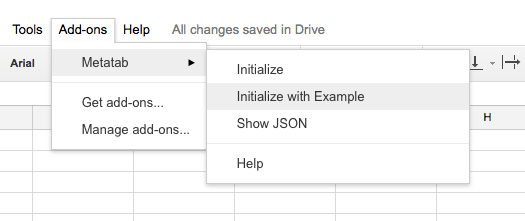
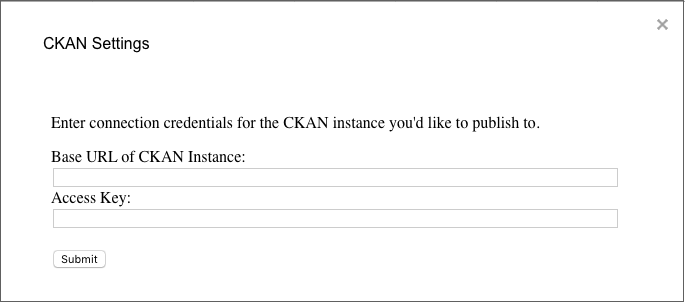
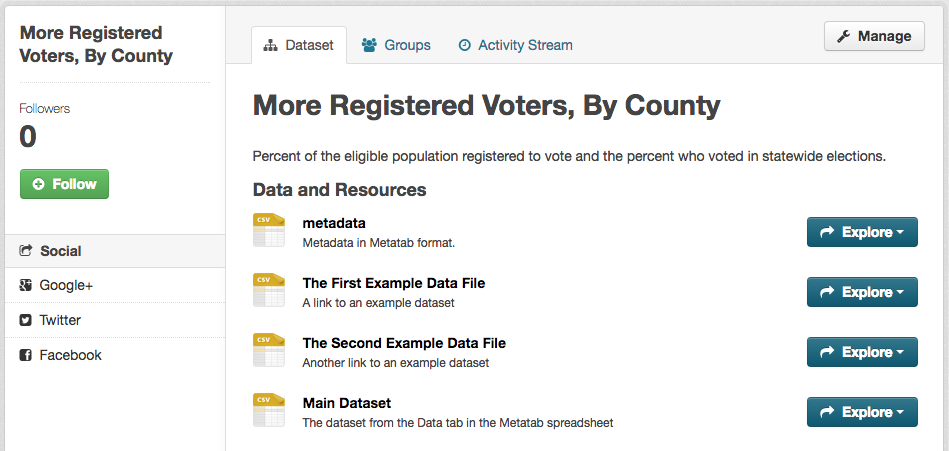
Release 11 of the Metatab Add-On for Google Spreadsheets adds a significant new feature: publishing to CKAN. By creating a spreadsheet with both data and metadata, the Add-On can be the entire interface to a CKAN data package. Like the rest of the Add-On, this feature is alpha-level, primarily intended as a technology demo. But, it is fully functional, and you can try it out now. 1) Visit the Metatab Add-On page to install the Add-On. This page isn’t available through search or the Chrome store yet, so you must use the link. 2) After installing the add on, create a new Google Spreadsheet. 3) In the “Add-Ons” menu, in the Metatab item, select “Initialize with Example.” Metatab will load in an example spreadsheet, including data and metadata. This example has three Datafiles in the Data section. Two are referenced as external links, and the last one refers to the Data tab in the spreadsheet. add-on-menus 4) In the Metatab Add-On menu, select “Set CKAN URL and Key. " Enter the base URL for a CKAN instance and API key for a CKAN user. They API key can be found in CKAN, in the sidebar of your user account page. set-ckan-key 5) Now, in the Metatab Add-On menu, select “Publish to CKAN”. When the script finishes, you can see a new data package in your CKAN repository. ckan-dataset The “metadata” and “Main Dataset” resources have links are to the CSV version of the original spreadsheet, so they will not work for users that don’t have access to view spreadsheet. The other two resources have the same links as in the Metatab spreadsheet.

Continue Reading →

Metatab Interface to datapackage.json

One of the inspirations for Metatab was the Frictionless Data project, from Open Knowledge International, the creators of CKAN. The project’s specification for data packages covers all of the common metadata for a dataset, and is extensible for less common needs. However, it is written in JSON, which was unfamiliar to a lot of the data creators that we worked with. That need for data creators who worked primarily in Excel to have a metadata format was the need that we started from. However, most metadata definitions will have the same structure, and it turned out that the most sensible structure for a Metatab file, combined with the most sensible way to turn metatab into JSON, resulted in output that was almost identical to the datapackage.json format. With the addition of a small Declare file, Metatab can directly output datapackage.json. Here is an excerpt of an example Metatab file, formatted for export to datapackage.json format. (You can get the whole file online from github. ) The Declare term specifies another Metatab file which adjust some of the terms, so the JSON output will be correct. Declarehttps://library-metatab-org.s3.amazonaws.com/assets.metatab.org/datapackage.csv
titleRegistered Voters, By County
descriptionPercent of the eligible population registered to vote and the percent who voted in statewide elections.
namecdph.ca.gov-hci-registered_voters-county
version1.3.4
SectionResourcestypedescription
resourcehttp://example.com/resource1.csv
.titleFirst Resource
.namethe-first-resource
.mediatypetext/csv
.formatcsv
schema
fieldidstringdescription
fieldstatestringdescription
fieldincomestringdescription
You can test the conversion, after installing the Python module and the metatab program, by running:

$ metatab -j https://raw.githubusercontent.com/CivicKnowledge/metatab-py/master/test-data/datapackage_ex1_web.csv

Continue Reading →